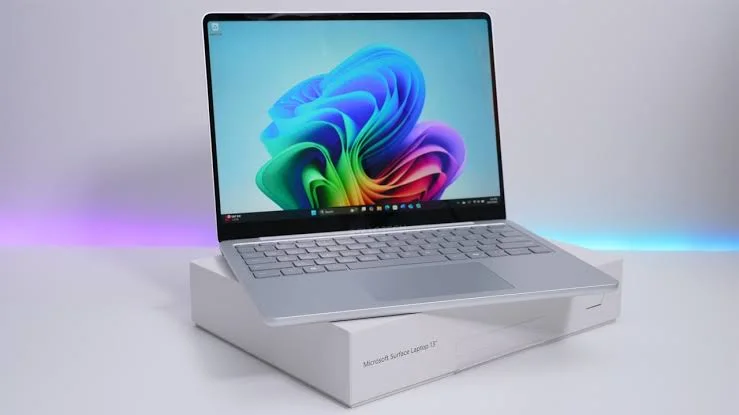
The Microsoft Surface Laptop 13 is designed for people who want a slim, stylish, and powerful laptop for everyday use. It combines modern hardware with a premium design and efficient Snapdragon X processors. However, one detail may disappoint users who prefer completely silent laptops. Unlike the fanless MacBook Air, the Surface Laptop 13 still uses an internal cooling fan.
So, is the Microsoft Surface Laptop 13 worth buying? More importantly, does the fan affect everyday use? Let’s look at its cooling system, performance, battery life, design, and overall value.
Microsoft Surface official website
Microsoft Surface Laptop 13: Why Does It Still Have a Fan?
Modern laptop processors are becoming more energy-efficient. As a result, manufacturers can build thinner devices without sacrificing too much performance. However, efficient processors can still generate heat when users run demanding applications.
Microsoft has retained active cooling in the Surface Laptop 13. The fan helps move heat away from internal components, especially during longer or more demanding workloads.
Without active cooling, a laptop may need to reduce processor speed when temperatures rise. This process is known as thermal throttling. Therefore, a cooling fan can help maintain performance during tasks such as large file transfers, photo editing, and intensive multitasking.
However, the fan does not automatically mean the laptop will be noisy. Its noise level depends on the workload, temperature, fan speed, and surrounding environment.
What Should You Expect?
Fan noise is an important consideration for anyone buying an ultraportable laptop. After all, a quiet working environment can make a noticeable difference during study sessions, office work, or late-night browsing.
During light tasks, such as reading websites, writing documents, and watching videos, an efficient laptop may need very little cooling. Under these conditions, the fan may remain off or operate at a low speed.
However, demanding tasks can increase the processor temperature. When that happens, the fan may become audible as it moves more air through the cooling system.
This does not necessarily indicate a problem. Instead, it is a normal part of active cooling. Still, users who work in quiet libraries or bedrooms may prefer a laptop that operates without a fan.
Actual noise levels can vary, so a controlled sound test would be needed to determine how quiet this particular model is under different workloads.

Performance and Battery Life
Battery life is one of the most important features of an ultraportable laptop. The Snapdragon X platform is designed to balance performance and power efficiency, making it suitable for everyday computing.
For students and professionals, this combination can be useful. It allows them to work on documents, browse the internet, attend online meetings, and manage multiple applications without constantly searching for a power outlet.
However, battery life depends on several factors. Screen brightness, background applications, video calls, network connectivity, and workload can all affect how long a laptop lasts on a single charge.
Therefore, buyers should check independent battery tests before relying on any specific runtime claim. Real-world results are more useful than estimates alone.
Premium Design and Everyday Usability
The Surface Laptop series is known for its clean appearance and practical design. A slim laptop with a quality keyboard and responsive trackpad can make everyday work more comfortable.
For students, writers, and office users, keyboard comfort is particularly important. A responsive trackpad also makes navigation easier when working without an external mouse.
Display quality matters just as much. A sharp screen can make text easier to read, while good colour reproduction benefits photo viewing and other visual tasks.
However, buyers should confirm the exact display resolution, brightness, refresh rate, touchscreen support, and available configurations before purchasing the 13-inch model.
Microsoft Surface Laptop 13: Main Advantages
The Surface Laptop 13 has several features that may appeal to everyday users.
- Efficient processor platform: Snapdragon X processors are designed to balance performance and power consumption.
- Portable design: A slim laptop is easier to carry between home, college, and the office.
- Everyday productivity: Web browsing, document editing, video calls, and multitasking are common laptop workloads.
- Active cooling: The fan can help manage heat during demanding tasks.
- Premium experience: The Surface Laptop range focuses on a refined design and comfortable everyday use.
The actual benefits depend on the specific configuration, software, and workload. Therefore, buyers should compare independent reviews before making a final decision.
Microsoft Surface Laptop 13: Disadvantages to Consider
Despite its potential advantages, the Surface Laptop 13 may not suit every buyer.
First, the cooling fan means the laptop cannot guarantee completely silent operation. Although the fan may be quiet during light use, demanding workloads can make it audible.
Second, active cooling introduces moving parts and air vents. Dust can accumulate over time, so keeping the laptop’s ventilation areas clear is important.
Third, Snapdragon-based Windows laptops may have compatibility limitations with certain applications, peripherals, or older software. Most everyday tasks may work well, but users who rely on specialised programs should check compatibility before buying.
Finally, the overall value depends on the selling price, RAM, storage, battery performance, and available alternatives.

Microsoft Surface Laptop 13 vs MacBook Air: Which Is Better?
The MacBook Air is a strong alternative for buyers who value silent operation. Its fanless design eliminates cooling-fan noise during use.
In contrast, the Surface Laptop 13 uses active cooling. This approach can help the processor manage heat during sustained workloads, although actual performance depends on the laptop’s design and power limits.
| Feature | Microsoft Surface Laptop 13 | Apple MacBook Air |
|---|---|---|
| Cooling system | Active cooling fan | Fanless |
| Fan noise | Possible under load | No cooling-fan noise |
| Operating system | Windows | macOS |
| Processor platform | Snapdragon X, depending on configuration | Apple silicon |
| Best suited for | Users who prefer Windows | Users who prefer macOS and silent operation |
Neither laptop is the right choice for everyone. Windows users may prefer the Surface for its operating system and software requirements. Meanwhile, buyers who prioritise completely silent operation may find the MacBook Air more appealing.
Performance, battery life, price, and application compatibility should also influence the final decision.
Is the Microsoft Surface Laptop 13 Worth Buying?
The Microsoft Surface Laptop 13 could be a good choice for users who want a portable Windows laptop with an efficient processor and active cooling. Its design and Snapdragon platform make it worth considering for everyday productivity.
However, the presence of a fan may disappoint buyers who expect a completely silent experience. Although active cooling can help control temperatures, it does not guarantee better performance in every situation.
Before buying, compare independent performance tests, real-world battery results, fan-noise measurements, and the price of competing laptops.
Ultimately, the Surface Laptop 13 makes the most sense for people who value Windows, portability, and everyday productivity more than completely silent operation. If zero fan noise is your top priority, the fanless MacBook Air remains an alternative worth considering.
Final verdict: The Microsoft Surface Laptop 13 offers a practical approach to portable computing, but buyers should consider its cooling system alongside battery life, performance, compatibility, and price before making a decision.
Also Read This
- Tesla Q3 2026 Results: Flat Revenue, but Free Cash Flow Beats Expectations
- iQOO 16R Certification: Latest Leaks, Expected Specs and Launch Details
- Jio IPO Day 2: QIB Demand and Subscription Details
- Xiaomi Redmi Book Laptops With Intel Wildcat Lake: What to Expect
- Dynabook Launches Lightweight Laptop with 32GB RAM and Optional 5G